 Remington Croft
What Does Collate Mean When Printing in 2026? (Collated vs Uncollated + Printer Picks)
Last updated: September 14, 2026 — printer prices verified against maker and major-retailer pages; first version of this guide.
Reviewed by Emily Holmes, General Reviewer, following our test method.
What does collate mean when printing? It means the printer outputs complete sets in page order — 1, 2, 3, then 1, 2, 3 again — instead of stacks of identical pages. You'll want it on for handouts, reports, and packets. Our default picks are the Canon imageCLASS MF445dw near $350 for heavy collated sets, the Brother HL-L2370DW at $159.99 for cheap duplex volume, and the Epson EcoTank ET-4850 near $499.99 for color sets that sip ink.
Quick answer: collated prints whole sets in order (1, 2, 3 — 1, 2, 3). Uncollated prints stacks of each page (1, 1, 1 — 2, 2, 2). Canon imageCLASS MF445dw is the best printer for collated office sets. Brother HL-L2370DW is the best value. Epson EcoTank ET-4850 is best for color. Details below.
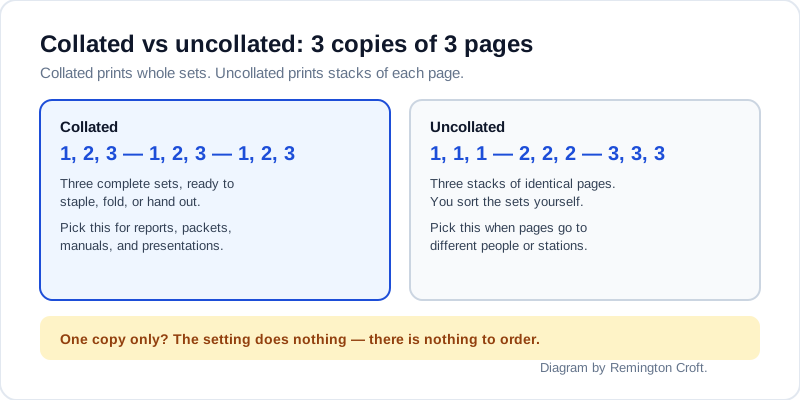
Collated sets versus uncollated stacks — diagram by Remington Croft.
Quick Comparison: Printers for Collated Sets at a Glance
Here's the honest part first: collate lives in your print dialog, not in the printer. You'll find it in Word, Acrobat, and macOS on nearly any modern machine. So shop for the traits that make collated sets painless — automatic duplex, a deep paper tray, and fast multi-copy output — instead of hunting for a collate badge.
| Method | Key Points | Best For |
|---|---|---|
| Canon imageCLASS MF445dw | 40 ppm mono; auto duplex; 50-sheet duplex ADF; $349.99 | Best for collated office sets |
| Brother HL-L2370DW | 36 ppm mono; auto duplex; 250-sheet tray; $159.99 | Best value duplex volume |
| Epson EcoTank ET-4850 | 15.5/8.5 ISO ppm; duplex; 30-sheet ADF; $499.99 | Best for color sets |
Dive deeper: Collate Printing Definition Explained; How to Collate In Word And Google Docs; How to Collate On HP Printer.
Machine prices below are per Brother — HL-L2370DW page, Canon — imageCLASS MF445dw support, and Epson — EcoTank ET-4850 page. Dialog behavior matches PaperCut — collate basics and PrintingCenterUSA — collate guide. Owner-review mining is thin on a settings topic, so claims below trace to maker specs plus those support docs, per our test method.
Best for Collated Office Sets: Canon imageCLASS MF445dw near $350
The MF445dw sells near $349.99 at major retailers like Office Depot. That buys a 40-page-per-minute mono laser, automatic duplex printing, a 50-sheet single-pass duplex ADF, and a 350-sheet standard capacity that grows to 900. Its driver lists Collating, booklet printing, and grouping as print features, and its copy menu offers Collate for ADF jobs. You'll feel the difference on 20-copy board packets that lesser trays interrupt.
Illustrative stock photo via Pexels.
- Grab it if: you print multi-copy reports weekly and want sets that leave the tray ready to staple
- Walk away if: you only print single pages or photos, where its mono engine adds nothing
- Spec to confirm: mono only, so color logos and charts will render in grayscale
Best Value Duplex Volume: Brother HL-L2370DW at $159.99
The HL-L2370DW lists at $159.99 on Brother's own page. That buys 36 pages per minute in mono, automatic duplex, a 250-sheet tray, and Wi-Fi plus Ethernet plus USB. It lacks an ADF and a touchscreen, so you'll scan on the flatbed and drive copies from your computer. For straight print-collation of Word and PDF sets, that's the right corner to cut.
- You'll love it if: you want the cheapest credible path to duplexed, collated handouts
- Skip when: you copy multi-page originals at the machine often and need an ADF
- Spec to confirm: 64 MB of memory, so very large graphics jobs spool slower than on office lasers
Best for Color Sets: Epson EcoTank ET-4850 near $499.99
The ET-4850 lists at $499.99 at major retailers, with sales watched near $349.99. That buys a cartridge-free color all-in-one at 15.5 ISO ppm black and 8.5 color, auto duplex, a 30-sheet ADF, a 250-sheet tray, and up to 2 years of ink in the box. Replacement bottle sets run far cheaper per page than cartridges. You'll save the most if your collated sets run color charts and photos by the dozen.
- Worth it when: your packets mix color pages with text and you print them by the stack
- Leave it if: you print mono office text, where a laser finishes sets faster per dollar
- Spec to confirm: inkjet duplex is slower than laser, so time a 50-set job before a deadline
How to Turn On Collate in Word, Acrobat, and Your Browser
Where's the checkbox? It moves by app, but the pattern never changes: set Copies above 1 first, since a single copy has nothing to order and many dialogs hide the option until then. In Word on Windows, go File, Print, and choose Collated in the Settings dropdown. In Acrobat or Reader, go File, Print, set your copies, and tick Collate. On a Mac, go File, Print, and tick the Collate box in the copies section. For copies made at the machine itself, load the ADF and look under Copy, Options, Collate or Sort.
Illustrative stock photo via Pexels.
- Word: File, Print, Copies, then Collated in Settings — uncollated shows as 1,1,1 / 2,2,2
- Acrobat: File, Print, Copies, then tick Collate before you hit Print
- Spec to confirm: Chrome's own dialog hides collate, so open Print using system dialog and set it there
When to Collate and When You Shouldn't
So which jobs get the tick? Ask whether each recipient needs one complete set in order. If yes, collate: board decks, contracts, training packets, and anything you'll staple or bind. If your pages go to different people or stations — sign-up sheets, flyers, forms on a counter — leave it off so identical pages stay stacked. And if you're printing one copy, stop hunting: the setting can't change a single set.
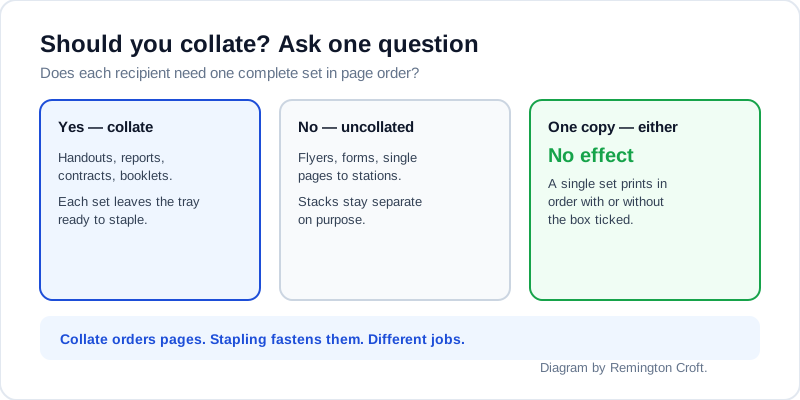
One question decides it — diagram by Remington Croft.
- Collate: multi-copy reports, packets, and booklets that must read in order
- Don't collate: single-page runs and pages that recipients pick from separate stacks
- Spec to confirm: collate orders pages while stapling fastens them — you'll often want both, in that order
Setup Tips to Get Cleaner Sets Faster
Your first big job teaches what the dialog never says. Print one test set before you commit to fifty, since a margin error multiplied across collated copies wastes the whole stack. Fan the paper and square the tray guides — don't let a skewed pickup jam the job mid-set and restart your count. Pair collate with duplex and staple in that order — sequence first, sides second, fastening last — and your packets will leave the tray ready to hand out. That quiet moment when fifty sets land in order is the whole payoff.
Collate Printing FAQ
What does collate mean when printing?
Collate means printing complete sets in page order, so 3 copies of a 3-page document come out as 1, 2, 3 — 1, 2, 3 — 1, 2, 3. You'll hand each set out as-is, with no sorting step between the tray and the meeting room.
What is the difference between collated and uncollated?
Collated prints whole sets in order while uncollated prints all copies of each page together, like 1, 1, 1 — 2, 2, 2 — 3, 3, 3. You'll pick collated for anything read in order and uncollated when identical pages belong in separate stacks.
How do I collate when printing from Word?
Open File, Print, set Copies to 2 or more, then choose Collated in the Settings dropdown. If you only see one copy set, the dropdown won't offer the choice, since there's nothing to reorder.
Why is collate greyed out on my printer?
It usually means you've asked for a single copy, opened a driver with the option on another tab, or printed from a browser dialog that hides it. You'll fix most cases by raising Copies above 1, checking Finishing or Paper Handling tabs, or switching to the system print dialog.
Is collating the same as stapling?
No, and mixing them up causes the classic meeting-room scramble. Collating puts pages in order while stapling fastens them, so you'll tick collate first and add staple or booklet finishing second.
Bottom Line
Canon imageCLASS MF445dw for heavy collated office sets, Brother HL-L2370DW for cheap duplex volume, and Epson EcoTank ET-4850 for color sets.
Related Guides
- Collate Printing Definition Explained
- How To Collate In Word And Google Docs
- How To Collate On HP Printer
- Printer Not Collating Fixes
- Collate Vs Uncollated When To Use
- Collated Vs Grouped Print Settings
- How To Collate Double Sided Documents
- Printer Ink And Paper Cost For Bulk Printing
- How Much Is a 3D Printer in 2026: Price Tiers and Running Costs
- Data Only SIM Card Guide 2026: Tablet, Hotspot and IoT Plans
- How to Measure a Room for Furniture in 2026
- How to Sew a Button in 2026
Sources: Brother — HL-L2370DW page; Canon — imageCLASS MF445dw support; Epson — EcoTank ET-4850 page; PaperCut — collate basics.