 Remington Croft
Does Instagram Notify When You Screenshot in 2026? (Stories, Posts, Reels and DMs)
Last updated: September 14, 2026 — rechecked disappearing-message behavior against Instagram's Help Center pages and a September 2026 hands-on DM test; first version of this guide.
Reviewed by Emily Holmes, General Reviewer, following our test method.
Does Instagram notify when you screenshot? No for Stories, posts, Reels, profiles, and regular DMs, and yes for disappearing DM photos, View Once videos, and anything in Vanish Mode. That split has held since 2018, so you'll know exactly where you stand before your thumb hits the button.
Quick answer: Stories, posts, Reels, and profiles are silent for most people saving everyday content. Regular DMs are silent when you're keeping receipts from a normal chat. View Once, Allow Replay, and Vanish Mode alert the sender when discretion matters most. Details below.
Quick Comparison: Instagram Screenshot Rules at a Glance
Ask one question first: was this content designed to disappear? If it stays put, your capture is invisible. If it vanishes after viewing, assume the sender will know.
| Method | Key Points | Best For |
|---|---|---|
| Permanent surfaces: Stories, posts, Reels, profiles, Highlights | No screenshot or screen-recording alert on public or private accounts; Story viewer list shows views only | Most people saving everyday content |
| Regular DMs: text, camera-roll media, voice notes, shared posts | No alert for standard chats that stay in history; same rule for screen recording | Keeping receipts from a normal chat |
| Disappearing DMs: View Once, Allow Replay, Vanish Mode | Sender alerted in the chat thread; newer app versions may block the capture with a black screen instead | Discretion when content was meant to vanish |
Dive deeper: Instagram Screenshot Rules Explained; Instagram Vanish Mode Notification Fixes.
The core rule traces to Instagram's own docs. Disappearing photos carry a seen-or-screenshotted status per Instagram — disappearing photo status. Vanish Mode warns you'll be flagged if capturing is detected per Instagram — Vanish Mode. Sending rules for temporary media live per Instagram — disappearing photos and videos. Hands-on testing matches: a September 2026 two-account DM test found regular chats silent while View Once plus Vanish Mode flagged every time per InstaTools — DM screenshot test. That lines up with Android Police — screenshot notifications. Claims below stick to what those sources substantiate, per our test method.
Stories, Posts, Reels, and Profiles Stay Silent

A Story on your screen is yours to save quietly. Nobody gets told. (Illustrative stock photo via Pexels.)
You'll feel that cold little jolt of panic the first time you screenshot someone's Story. Ignore it. Instagram does not notify anyone when you screenshot or screen-record a Story, Close Friends Story, Highlight, feed post, carousel, Reel, profile, bio, comment, or Note. The poster can see you viewed their Story in the viewer list, but nothing marks you as someone who saved it.
So why does everyone believe otherwise? Because the fear comes from a real event. Instagram ran a short test in early 2018 that put a small icon next to screenshotters in the Story viewer list, then pulled it within months after users hated it. That test never returned, yet screenshots of the test still circulate as if they're current policy.
- Safe when: you're saving a meme, a recipe Reel, a travel post, or a profile link for later
- Risky when: never on these surfaces, though reposting someone's private content without asking can still damage a friendship
- Fact to confirm: Close Friends Stories follow the same no-alert rule, since the list limits who sees the Story without adding capture tracking
Regular DMs Are Silent Too
A normal chat thread captures silently, text and all. (Illustrative stock photo via Pexels.)
What about a normal conversation? The same calm applies. You can screenshot text messages, emoji reactions, voice-note bubbles, GIFs, shared posts, shared Reels, and ordinary camera-roll photos that stay in the chat, and the other person sees nothing. There is no in-chat notice, no push alert, and no log entry.
The tell is visual. A regular DM sits on a normal light background with a standard photo thumbnail you can scroll back to. No timer icon, no View Once label, no dark Vanish Mode backdrop. If none of those markers is present, you're looking at a permanent message, and permanent messages don't report captures.
- You'll stay silent if: you're documenting plans, prices, threats, or anything in a standard thread for your own records
- You'll get flagged if: the chat background turns dark or the media shows a one-time label, since you've crossed into disappearing territory below
- Fact to confirm: voice messages and shared feed posts in a standard thread carry no capture detection in any version testers have documented
Disappearing DMs Are the One Real Exception
Disappearing media looks different before you open it, and that difference is the whole warning. (Illustrative stock photo via Pexels.)
Here's where the rules flip. A photo or video sent through the DM camera marked View Once or Allow Replay counts as borrowed. So does anything sent while either of you has Vanish Mode on. Screenshot it or screen-record it and the sender finds out. Screen recording follows the exact same tripwire, so switching methods buys you nothing.
How do you spot it before you tap? Look for three markers. A timer or View Once label sits on the media instead of a normal thumbnail. An Allow Replay tag marks videos you may open twice. A dark chat background with a Vanish Mode header sits across the top. Swipe up in a DM turns Vanish Mode on, and everything inside that dark chat counts as disappearing, including plain text.
- Worth capturing when: almost never, since the sender chose impermanence and the app keeps score
- Leave it alone when: you see any of the three markers above, or when trust matters more than the save
- Fact to confirm: Instagram's web app generally can't open View Once media at all, which closes the laptop loophole newer guides still suggest
What the Sender Actually Sees When You Get Caught
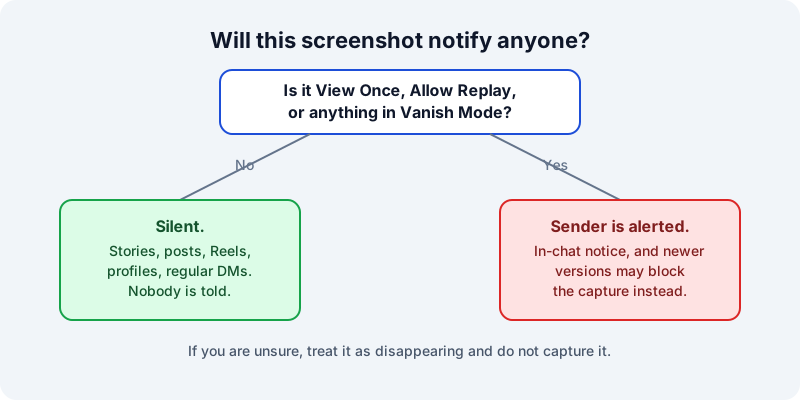
One question decides it: was the content meant to disappear? — diagram by Remington Croft.
Most guides say "the sender is notified" and stop there, which leaves you guessing what that means. For a single View Once or Allow Replay photo, the sender sees a small dotted-circle status beside the message, marking it as captured. Inside Vanish Mode, it's louder: a system line appears in the thread reading that someone took a screenshot, visible to both of you the next time the chat opens. Neither one buzzes the sender's lock screen. The notice waits inside the conversation.
And there's a newer twist the top results underplay. Since late 2024, many app versions have moved past warnings toward prevention. The screenshot lands as a black rectangle, or the capture fails outright with a can't-capture message. That mirrors how WhatsApp guards its own view-once media. Behavior still varies by phone, OS, and rollout wave, so don't bank on any single outcome. Treat every disappearing capture as both detected and possibly blocked.
- Dotted circle: single disappearing photo or video captured in a standard thread
- In-chat system line: anything captured while Vanish Mode's dark backdrop is showing
- Fact to confirm: a second phone photographing your screen defeats detection completely, which is exactly why you should never trust disappearing messages with anything sensitive
Mistakes That Get People Caught
After comparing maker docs with tester reports and reader forums, the same five misreads explain nearly every awkward "wait, they know?" moment. None of them is a technical glitch. Each one is someone misjudging which side of the line they're on.
- Trusting Airplane Mode: the old trick of killing the connection before capturing is unreliable now, since the app can queue the flag and report it when you reconnect
- Assuming screen recording is stealthier: recording trips the same detector as a screenshot on disappearing media, and on some phones it yields a black video plus the alert
- Missing Vanish Mode: the dark background is easy to overlook at midnight, yet every capture inside it is flagged, even plain text you'd swear was ordinary
- Believing third-party detector apps: no outside app can reveal who screenshotted your Story or posts, because Instagram never shares that data, so most such apps harvest logins instead
- Falling for viral 2026-alert posts: recycled screenshots of the 2018 test keep going viral as "new policy," and each wave scares a fresh cohort for nothing
Setup Tips to Stay on the Right Side
Set your own defaults once and you'll stop thinking about this entirely. If you're sending something sensitive, send it as View Once from the DM camera rather than posting it anywhere, since that's the only surface that actually reports captures. If you're receiving, use Instagram's bookmark on posts and Reels instead of screenshots when all you want is a private save. Keep anything you'd hate screenshotted behind a private account plus Close Friends, and treat every Story as permanent the moment you post it, because for practical purposes it is. That quiet discipline beats checking rumor posts before every tap.
Screenshot Notification FAQ
Does Instagram notify when you screenshot a story?
No. Instagram sends no alert when you screenshot or screen-record any Story, including Close Friends Stories and Highlights. The poster sees your name in the viewer list, but nothing marks the capture.
Does Instagram notify when you screenshot a post or Reel?
No. Feed posts, carousels, Reels, profiles, bios, comments, and Notes have never carried screenshot detection. You can capture them on any account type without the creator knowing.
Does Instagram notify when you screenshot a DM?
It depends on the message type. Standard chats with text, camera-roll photos, voice notes, and shared posts capture silently. View Once photos, Allow Replay videos, and anything in Vanish Mode alert the sender.
Does Instagram notify when you screen record?
Screen recording follows the same rules as screenshots. Stories, posts, Reels, profiles, and regular DMs record silently. Recording disappearing DM media or Vanish Mode triggers the same in-chat alert, and newer versions may return a black screen.
Can someone see if you screenshot their Instagram profile?
No. Screenshotting a profile page, bio, follower list, grid, or Highlights sends no notification. Instagram also provides no list of profile visitors, so a capture leaves no trace the owner can see.
Bottom Line
Stories, posts, Reels, profiles, and regular DMs capture silently. View Once, Allow Replay, and Vanish Mode always tell the sender.
Related Guides
- Instagram Screenshot Rules Explained
- Instagram Vanish Mode Notification Fixes
- How To Control Story Privacy Settings
- Instagram Privacy Apps Cost And Safety
- Replacement SIM Card Guide 2026: Cost, Process and eSIM Shortcut
- Data Only SIM Card Guide 2026: Tablet, Hotspot and IoT Plans
- US Mobile Prepaid SIM Card Starter Kit Review in 2026
- What Does Collate Mean When Printing in 2026? (Collated vs Uncollated + Printer Picks)
Sources: Instagram — Vanish Mode; Instagram — disappearing photo status; Instagram — disappearing photos and videos; InstaTools — DM screenshot test, September 2026; Android Police — screenshot notifications; Photos: Pexels.