 Remington Croft
Replacement SIM Card Guide 2026: Cost, How to Get One & the eSIM Shortcut
Last updated: September 11, 2026 — carrier processes verified against Verizon, T-Mobile, AT&T, and Apple support pages; first version of this guide.
Reviewed by Emily Holmes, General Reviewer, following our test method.
A replacement SIM card gives your existing phone number and plan a new piece of hardware — needed when a SIM is lost, stolen, or damaged, when a new phone takes a different size, or when moving a line between devices. The short version for 2026: replacements typically cost $0–$10 depending on carrier and channel. Your number stays the same, and eSIM-capable phones can often skip the plastic entirely with a free two-minute transfer. If the phone itself is lost or stolen, secure the line before ordering anything (see below) — that order matters more than speed.
Quick answer: get a free or ~$10 replacement at your carrier's store (fastest), order one shipped if you can wait days, or use eSIM Quick Transfer between iPhones for $0 in minutes. Lost or stolen means suspend the line first, then replace — don't skip that order. Details below.
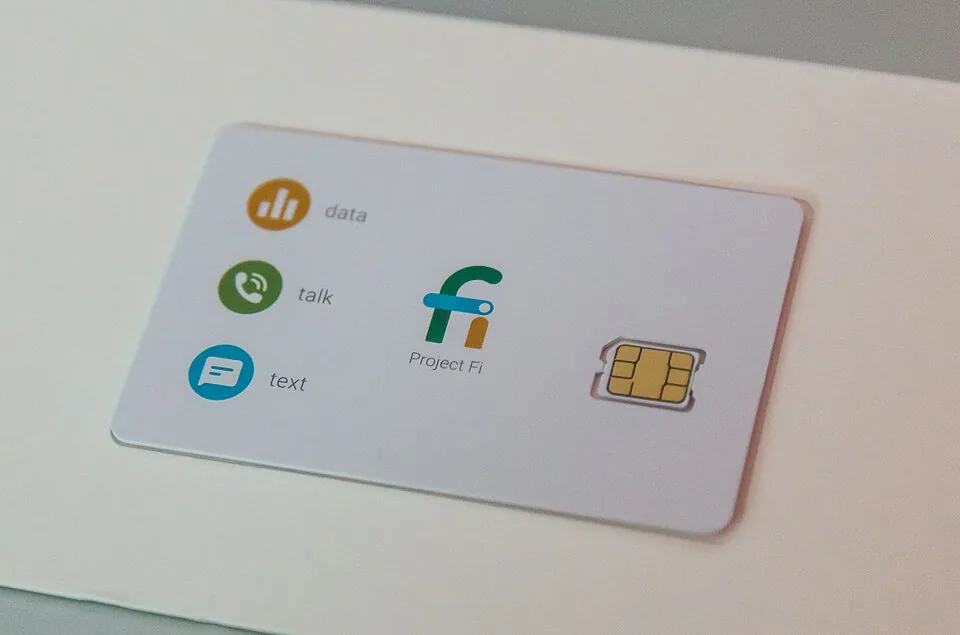
Illustrative SIM close-up via Wikimedia Commons — not a carrier-issued card.
When You Actually Need a Replacement SIM
Five situations cover nearly every case. Lost, stolen, or damaged card is the classic — snapped plastic, corroded contacts, or a phone (and its SIM) gone missing. New phone, different fit still happens when jumping between older micro-SIM devices and modern nano trays, though 3-in-1 triple-cut cards have made this rarer. New phone with eSIM is the 2026 default: US iPhones sold since 2022 have no SIM tray at all, so the "replacement" is a digital transfer, not a card. Switching carriers while keeping your number needs the new carrier's SIM or eSIM — not a replacement from the old one. And second lines or travel setups sometimes need a fresh physical SIM for a dual-SIM slot. If none of these apply — same phone, same carrier, working card — you don't need anything. Close the tab and enjoy your day.
- Lost/stolen/damaged: replacement SIM on the same account and number
- New phone: size change means new plastic, or eSIM transfer means none
- New carrier: that's a starter kit, not a replacement — see our US Mobile starter kit guide
How Much a Replacement SIM Costs in 2026
Card prices are small; the gotchas sit around them (activation fees, shipping, in-store labor). Verified figures first, surveys labeled as surveys:
| Pick | Key Specs | Best For | Buy |
|---|---|---|---|
| Counter replacement — in-store | Free–~$10 (Verizon free counter, T-Mobile ~$10 often waived, AT&T ~$5 reported); ID + account auth; same number to new ICCID | Fastest plastic today | Buy on Amazon |
| eSIM transfer — Quick Transfer / QR | $0 at most carriers; iPhone-to-iPhone Bluetooth + QR; Wi-Fi required | Fastest overall, no mail | Buy on Amazon |
| Suspend + secure first — lost/stolen | Suspend line online, IMEI block, bank + Find My, then replacement + SIM PIN | Lost or stolen phones | Buy on Amazon |
Dive deeper: eSIM vs Physical SIM for Tablet Activation Compared; How to Replace a Lost Phone SIM Card; How to Cut Micro SIM to Nano SIM Safely.
Two cost traps hide next to the card itself. Activation fees ($25–$35 at several postpaid carriers) are independent of SIM cost and usually waived online or on prepaid — so ask which line item you're actually paying. In-store setup labor and expedited shipping ($5–$15) are optional costs for help and hurry, not the card. Industry surveys land the typical self-serve replacement at $0–$15 all-in; treat any quote above that as labor or activation, and question it. See our starter-kit cost breakdown for the full day-one math when switching carriers entirely.
Three Ways to Get a Replacement
1. Carrier store — fastest for plastic. Walk in with ID and your account, walk out connected: staff issue the card, swap the ICCID onto your line, and your number moves to the new SIM in minutes. Ask explicitly whether a card fee or setup fee applies before they start — waivers are common but never automatic. 2. Shipped SIM — easiest from the couch. Order through your carrier account or support; the card arrives in days (overnight costs extra), then activate online by entering the SIM card number (ICC ID, printed on the credit-card-sized carrier). Keep the old card until the new one goes live — don't toss your only working service prematurely. 3. eSIM transfer — fastest overall. No card, no mail, usually $0: Apple's Quick Transfer moves the number iPhone-to-iPhone over Bluetooth (same Apple Account, both on recent iOS, devices nearby — multi-number supported on current releases), carriers offer QR-code or in-app activation (US Mobile does it inside its app with a fresh QR), and Android-to-iPhone transfers run through a QR handshake on current OS versions. Wi-Fi is required for most eSIM activations, and converting a physical SIM to eSIM on the same iPhone is supported where carriers allow it.
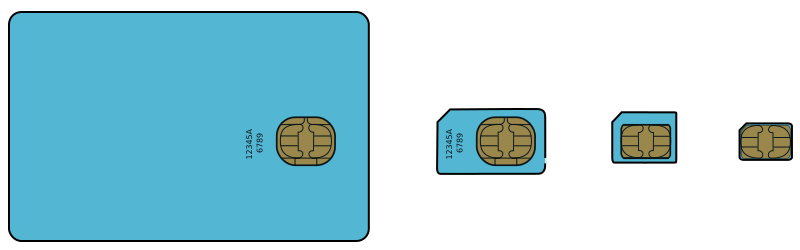
SIM size evolution diagram via Wikimedia Commons — modern phones use nano or eSIM.
- Have ID and account access ready: replacements authenticate against the account holder, not the handset
- Locate the ICCID: printed on the SIM carrier card and in tiny font on the SIM itself
- Keep Wi-Fi available: eSIM downloads and carrier activations need it
Lost or Stolen: Secure the Line First
Order of operations matters more than speed here, because whoever holds your SIM can receive your calls and two-factor codes. Yes — that includes your bank logins. Step 1: suspend the line immediately — every major carrier offers this online (T-Mobile: account → line details → report lost/stolen → suspend with IMEI block; Verizon: My Verizon suspend with a 30-day lost/stolen window; bills still run while suspended). Step 2: block the device's IMEI so it can't rejoin networks on another SIM — carriers report it to the international blocklist; find it on the box or via your Apple ID devices page. Step 3: protect accounts — warn your bank (numbers anchor banking authentication), change key passwords, and use Find My / Find My Device to locate, lock, or erase. Step 4: report theft to police where applicable and dispute any post-loss charges fast. Only then order the replacement SIM or eSIM for your spare or new phone. A SIM PIN (required at every restart) would have blunted all of this — set one on the replacement and skip the sequel.
- First call: carrier suspension — stops usage charges and 2FA interception in one move
- Second call: bank and key accounts if the device was unlocked or unprotected
- Then: replacement SIM/eSIM plus a SIM PIN on the new card
Will I Keep My Number?
Yes — in every standard replacement flow. Your number lives on your carrier account, not on the plastic: issuing a replacement re-links the same number to a new ICCID (physical) or a fresh eSIM profile (digital), and transfers deactivate the old SIM as the new one activates. Porting to a new carrier also keeps the number, but that's a transfer-out with the old account kept active until it completes — a different process from a same-carrier replacement. The one exception: long-dead prepaid accounts (T-Mobile notes numbers can be lost after extended non-payment). Replacements assume a live account, so don't wait months.
How Long Does It Take?
In-store replacement runs minutes door to door. eSIM transfer or QR activation runs about two minutes on Wi-Fi once authenticated. Shipped SIMs take days each way plus a minutes-long online activation — the "short wait" carriers mention. Suspend-and-restore cycles are account-instant; IMEI unblocking after recovery can take up to 24 hours on some carriers. Plan around the shipping leg, not the activation.
Switching Carriers Instead of Replacing?
If the lost phone has you rethinking the carrier itself, price the switch rather than defaulting to a replacement. Our US Mobile starter kit guide totals the day-one math ($0 eSIM trial through $45 bulk intros), and the cheapest physical on-ramps verified are the Tello $3 SIM kit on Amazon and the Mint Mobile starter kits on Amazon — keep the old line active until any port completes.
Setup Tips to Get Better Results Faster
Three setup habits make any replacement faster — all from the secure, number, and timing notes above:
- Suspend before you order: freeze the line online first to stop usage and 2FA interception, then order the replacement — never the reverse.
- Have ID, account access, ICCID, and Wi-Fi ready: replacements authenticate against the account holder, eSIM downloads need Wi-Fi, and activation needs the new SIM's ICC ID — keep the old card until the new one goes live.
- Set a SIM PIN on the replacement: required at every restart, it blunts the next loss — and plan around shipping, not activation, since IMEI unblocks can take up to 24 hours.
Replacement SIM FAQ
How much does a replacement SIM card cost?
Usually $0–$10: free at many carrier counters (Verizon stores report free; T-Mobile lists ~$10 often waived; AT&T ~$5 in third-party surveys), $0–$7 for MVNO kits, and $0 for eSIM profiles. Activation fees and expedited shipping are separate line items — confirm which you're being quoted.
Do I keep my number with a replacement SIM?
Yes. The number stays on your account while the replacement card or eSIM profile takes over service; the old SIM deactivates as the new one goes live.
How long does a replacement take?
Minutes in store, about two minutes for eSIM transfer on Wi-Fi, or days if a physical SIM ships. IMEI unblocks after a recovery can take up to a day.
My phone was stolen — what do I do first?
Suspend the line with your carrier immediately (online account or support call), block the IMEI, then protect bank logins and passwords, use Find My tools, and report theft to police. Order the replacement only after the line is frozen.
Do I need a new SIM for a new phone?
Sometimes: different tray sizes need new plastic (or a triple-cut card), while eSIM phones transfer digitally with no card at all — iPhone-to-iPhone moves over Bluetooth, Android-to-iPhone via QR on current software. Same-size tray swaps usually just move the old card over. When in doubt, try the old card first; it's already paid for.
eSIM or physical SIM — which should I choose?
eSIM for speed ($0, minutes, nothing to lose) on 2018-plus phones — mandatory on tray-less US iPhones since 2022. Physical for tray-only devices, frequent phone-swappers, and anyone who likes holding the backup in hand.
Bottom Line
Get the free-or-cheap counter replacement when you need plastic today, use the $0 eSIM transfer when your phones support it, and suspend first when anything is lost or stolen — keep a spare $3 Tello kit so the next replacement is an errand, not an emergency. Switching carriers instead? Start with our starter kit guide. Either way, you're back on the network today.
Related Guides
- eSIM vs Physical SIM for Tablet Activation Compared
- How to Replace a Lost Phone SIM Card
- How to Cut Micro SIM to Nano SIM Safely
- SIM Not Provisioned Error Fix
- How to Transfer Number to New SIM or eSIM
- How to Check SIM Card Size Compatibility
- How to Unlock Phone for New SIM Carrier
- How to Back Up Contacts Before SIM Swap
- No Service After SIM Swap Fix
- Bring Your Own Device SIM Compatibility
- US Mobile Prepaid SIM Card Starter Kit Review in 2026
- Data Only SIM Card Guide 2026: Tablet, Hotspot & IoT Plans Compared
- 4 Best Leather Laptop Bags for Work in 2026
- Billingham Thomas Briefcase and Laptop Bag Review in 2026
Sources: Verizon Community — SIM cost thread; T-Mobile — store replacement pricing note; T-Mobile — lost/stolen support; AT&T — free switch SIM offer; Apple — eSIM setup and Quick Transfer; Kaspersky — stolen-phone response; Wikimedia Commons — nano SIM photo.
.jpg)